Official Mac, iPhone, iPad, and Apple TV releases

CONFLUX / LIVE VIEWING SYSTEM

Your streamers, live in one place.

汇流直播 brings live streams from Bilibili, Douyu, Huya, Douyin, and Xiaohongshu into one native app, so you can close that row of browser tabs.

05 live platforms 04 Apple screens 01 one-time purchase
LIVE SIGNAL / 01 ON AIR
CONFLUX LIVE4K / ORIGINAL
BILIBILI / MAIN STAGELIVE 00:41:28
Now watching Live danmaku · Original / 4K / Dolby
● STREAM STABLE
ON AIRBILIBILIDOUYUHUYADOUYINXIAOHONGSHUON AIRBILIBILIDOUYUHUYADOUYINXIAOHONGSHU

FIELD NOTE / 01

Live on five platforms,
listed in one place.

You no longer need to remember which platform a streamer lives on. Follow, go-live, and watch all happen in one app.

APPLE TV / HOME01—05
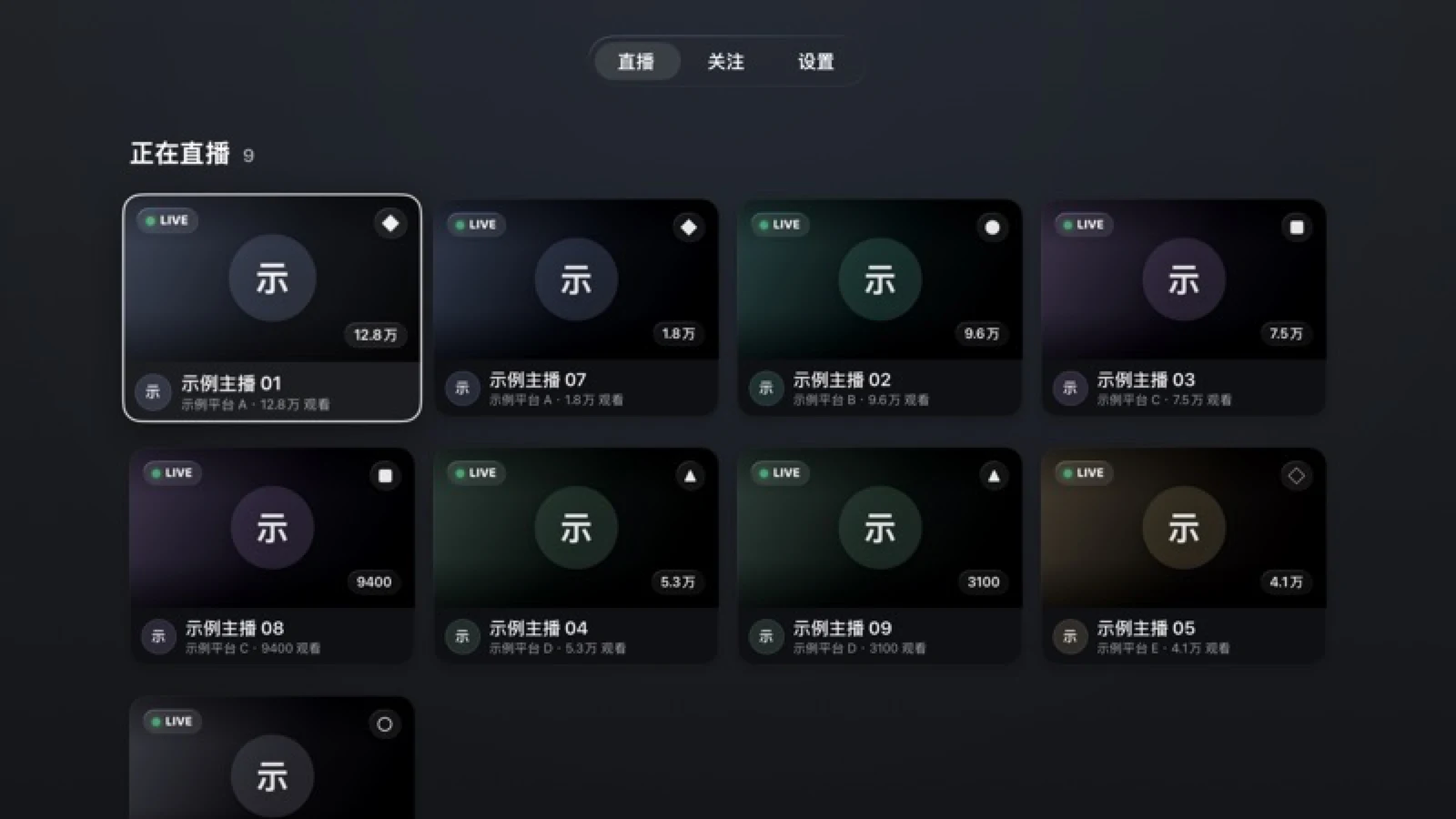
The 汇流直播 Apple TV live-now list
Open the app and the follow list is there, with who is live at a glance.
01

Follow

Paste a live-room URL and the platform is recognized automatically. A streamer who is not live yet can still join your list.

02

Go live

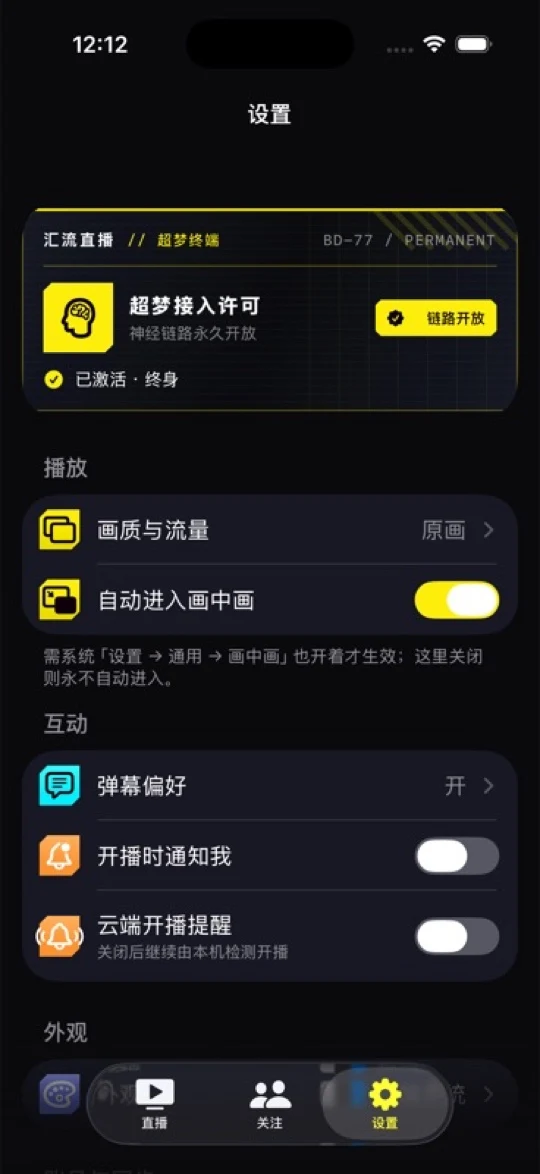
On-device detection and system go-live notifications are free; when you step away, the cloud can keep watching.

03

Watch

Switching channels, quality, danmaku, and multiple windows all revolve around the stream itself, not the browser's tabs.

See how Cloud Watch works

FIELD NOTE / 02

Every frame here
is the app as it really is.

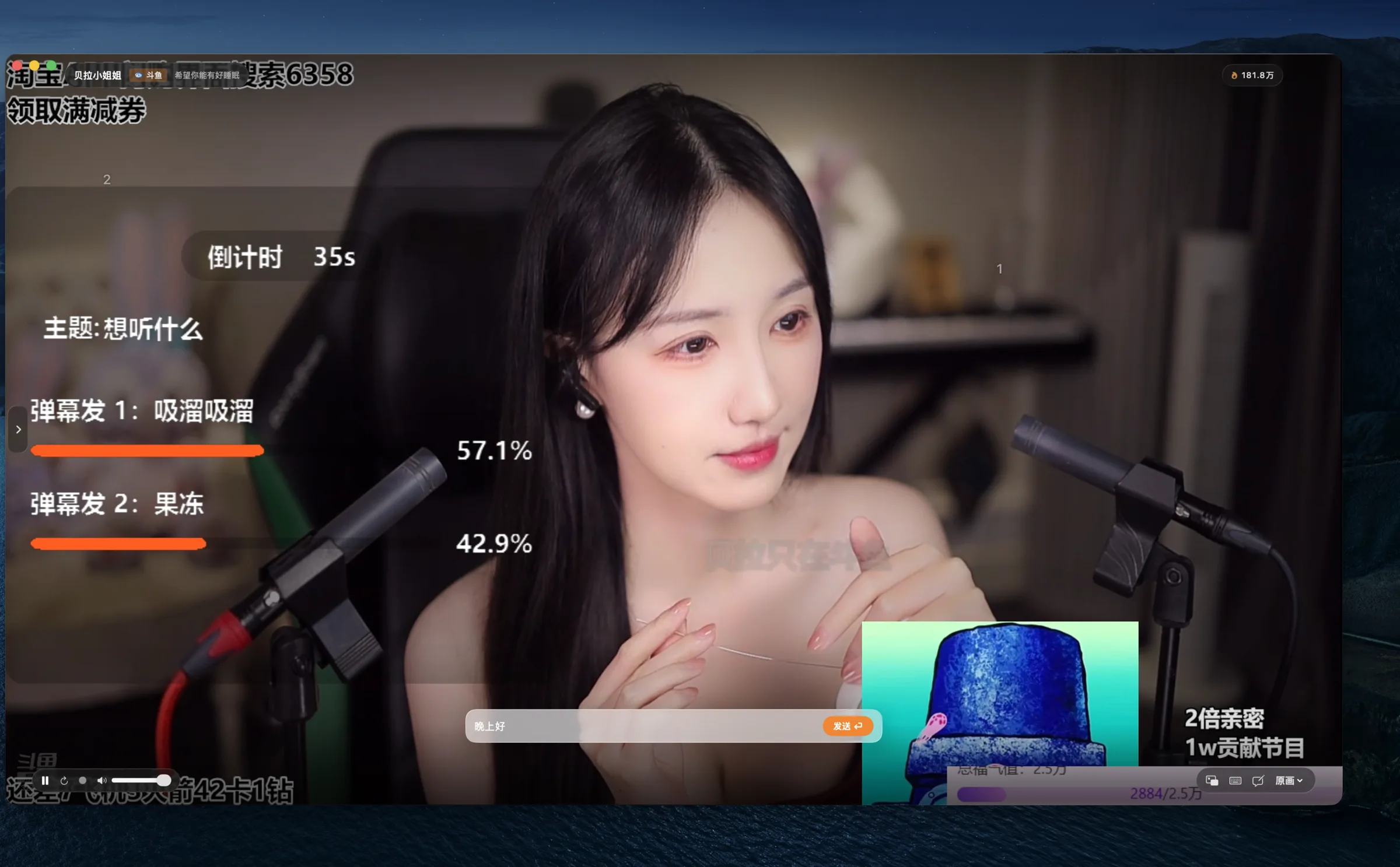
Footage, danmaku, multiple windows, and high-bitrate quality all come from the version people actually use.

  • Native playbackmacOS / iOS / iPadOS / tvOS
  • Danmaku you can watch and sendSending supported on Bilibili, Douyu, and Huya
  • Highest-bitrate qualityOriginal, 4K, Dolby and more as each platform offers
LIVE CHAT / COMPOSEREAL CAPTURE
The danmaku compose bar and live danmaku in the 汇流直播 player
Once signed in, send danmaku right from the player.

SIGNAL MAP / 05 CHANNELS

Five live platforms,
and what each one does.

Capabilities differ across platforms, and we do not pretend otherwise. Each is spelled out below.

Bilibili哔哩哔哩Video / Danmaku / Status / AlertsDolby · 4K · Original
Douyu斗鱼Video / Danmaku / Status / AlertsMultiple lines · High bitrate
Huya虎牙Video / Danmaku / Status / AlertsSmart quality mapping
Douyin抖音Video / Danmaku / Status / AlertsOriginal · Live danmaku
Xiaohongshu小红书Video / Status / AlertsDanmaku depends on client and sign-in state

Want a platform beyond these five? Contact the author and ask. Whether it can be supported depends on that platform's APIs and danmaku protocol.

NIGHT SHIFT / CLOUD WATCH

The streams you want, watched for you in the cloud.

Even when the app is not running, monitoring can continue for the streamers you have enabled alerts for. When they go live, the alert lands on your device.

See the Free and Full Version boundary
MONITORING ROUTE READY
08:00
On-device detection

Checks your follow list while the app runs or during system-scheduled background refreshes.

Free
18:42
Streamer goes live

A streamer you enabled alerts for comes online.

LIVE SIGNAL
18:42
System go-live notifications

System notifications, APNs, and banners are always free system capabilities.

FREE SYSTEM DELIVERY
Continuous cloud monitoring

The Full Version hosted service keeps watching the streamers you enabled alerts for.

Full Version · Mac / iPhone / iPad

Only streamers you enabled alerts for are monitored. Turning the service on submits those streamers' platform and room identifiers; how they are used is written in the Privacy Policy. Delivery depends on the network and the live platforms and is best-effort. Apple TV does not offer it.

汇流直播 settings and notification capabilities on iPhone
汇流直播 live-now list on Apple TV

ONE FOLLOW LIST / FOUR SCREENS

Four screens,
one follow list.

macOS keeps efficiency in the keyboard, windows, and menu bar; iPhone and iPad take watching and go-live alerts with you; Apple TV puts the streams back on the big screen. The three sides sync the follow list and preferences through the same Apple Account and iCloud.

macOSiOSiPadOStvOS
See how to get each version

THE SIGNAL IS FREE / THE SHIFT IS YOURS

Watch free. Unlock when you want more.

The app is a free download, and the Free Version has no viewing-time limit. The Full Version is a one-time in-app purchase that does not auto-renew.

FREE VIEW01

Free

Put the streams you watch in one place first.

  • Livestreams on five platformsNo time limit
  • View and send danmakuDefault style
  • Followed streamers3 per platform
  • On-device detection / system go-live notificationsIncluded
  • Menu bar presence / iCloud syncIncluded
Free download
FULL SIGNAL02

Full Version

The complete console for heavy viewers.

  • Followed streamersUnlimited
  • Danmaku customizationSize / speed / area / blocklist
  • Continuous cloud monitoringMac / iPhone / iPad
  • Multiple windowsIncluded
  • iPhone / iPad appearance themes3 themes
See your App Store price
汇流直播 Free and Full Version feature comparison
Feature Free Free download Full Version Your App Store price
Livestreams on five platforms No time limit No time limit
View and send danmaku Default style Size / speed / opacity / area / density / blocklist / hot-word panel
Followed streamers 3 per platform Unlimited
System go-live notifications Included Included
Cloud go-live alerts Mac, iPhone, and iPad only On-device detection Continuous cloud monitoring
Multiple windows Not included Included
Menu bar presence Included Included
Appearance themes iPhone and iPad only System / Light / Dark 3 themes
Viewing stats / data export / iCloud sync Included Included

Purchase. The Full Version is a non-consumable in-app purchase: pay once; it does not auto-renew. Price, taxes, and payment methods are shown by the App Store.

Restore Purchases asks StoreKit for valid App Store purchases owned by the current Apple Account.

Family Sharing is not currently supported. Restore Purchases only reads valid purchases owned by the current Apple Account.

Refunds are handled by Apple. Eligibility and outcomes vary by country or region and remain subject to applicable consumer law.

Platform differences. This table reflects the macOS feature set; rows that name a platform are available only there. Features on iPhone, iPad, and Apple TV follow what each client displays.

OPEN CHANNEL / FAQ

Questions? Look here.

Product, platforms, purchase, and cloud alerts — ask away.

How do I get 汇流直播?

The official Mac, iPhone, iPad, and Apple TV versions are available from the App Store as a free download. See the download page for versions, storefront availability, and system requirements; the app is not currently offered in the mainland China storefront.

Which live platforms does 汇流直播 support?

It currently supports live playback, live-status detection, and go-live alerts for Bilibili, Douyu, Huya, Douyin, and Xiaohongshu. Live danmaku is supported on Bilibili, Douyu, Huya, and Douyin; Xiaohongshu danmaku is a login-enhanced capability — available on macOS after sign-in, pending device validation on iOS/iPadOS, and not supported in the first tvOS release.

What can the Free Version do?

The Free Version offers unlimited-time viewing on five platforms and default-style danmaku, with up to 3 followed streamers per platform. On-device go-live detection, system go-live notifications, menu bar presence, basic appearance, viewing stats, data export, and iCloud sync are included as well. Upgrading to the Full Version unlocks unlimited follows, cloud go-live alerts, multi-window playback, danmaku customization, and appearance themes on iPhone and iPad. Exact capabilities vary by client.

What are cloud go-live alerts?

The streams you want, watched for you in the cloud. Even when the app is not running, monitoring can continue for the streamers you have enabled alerts for. On-device detection and system go-live notifications are available in the Free Version; the purchase only unlocks this hosted, continuous cloud monitoring. You turn it on yourself on Mac, iPhone, or iPad; Apple TV does not offer it. Turning it on submits the selected streamers' platform and room identifiers for cloud monitoring. The service depends on the network and the live platforms, and delivery is best-effort.

How do I buy the Full Version?

The 汇流直播 Full Version is a non-consumable in-app purchase on the App Store: pay once; it does not auto-renew. The price is the local price shown by the App Store at purchase time. After purchase, you can permanently use the Full Version features delivered by later versions of the same app.

How do I restore purchases?

Choose “Restore Purchases” on the purchase page or in Settings, and the app re-reads the valid App Store purchase records owned by the current Apple Account through StoreKit. If you purchased through another channel earlier, please email the author.

Is Family Sharing supported?

In-app purchases do not currently support Family Sharing. Restore Purchases only applies to valid purchases owned by the current Apple Account.

How do I request a refund?

All purchases are completed through Apple's App Store. Some purchases may be eligible for a refund; sign in to reportaproblem.apple.com to submit a request to Apple. Eligibility and outcomes vary by country or region and are subject to Apple's decision and applicable consumer law. If Apple refunds or revokes a transaction, the corresponding Full Version entitlement ends.

What are the system requirements?

The minimum requirements are macOS 15.0+, iOS/iPadOS 18.0+, and tvOS 18.0+. Actual availability follows the download page.

How do I use the Apple TV version?

Search for 汇流直播 in the Apple TV App Store and download it for free. The Full Version is purchased in-app, and “Restore Purchases” reads only the valid App Store purchase records owned by the current Apple Account. The follow list, preferences, and signed-in platform states sync through iCloud on the same Apple Account.

How do I add a streamer?

Paste a live-room URL and the platform is recognized and added automatically. Streamers can be added before they go live, and Xiaohongshu profile links and live-share links are supported too.

Can danmaku be customized?

The Free Version uses the default danmaku style. On Mac, iPhone, and iPad, the Full Version adjusts size, speed, opacity, area, density, blocklist, and a hot-word panel; the Apple TV Full Version adjusts opacity, area, speed, and size.

Can I send danmaku?

Yes. Once signed in, you can send danmaku right from the player — currently supported on Bilibili, Douyu, and Huya — and your own danmaku is highlighted.

Can my data be backed up?

The macOS version can export the streamer list as a JSON file for backup, and all three sides can also sync the follow list and preferences through iCloud.